In my last post (Coming up with a plan to manage my new, huge family history collection) I discussed how we were hopeful we’d find a balance between protecting this amazing find of a life time, and our family life, work, other genealogy, blogging, sleep, etc. That I haven’t posted in a month or so should give you a good indication of how completely we’ve failed at finding anything close to balance!
However, the first of the three boxes we received has now been inventoried and stored archivally, and it’s given us hints of just what an amazing collection this is. By the numbers, we found over 250 photographs, over 175 newspaper clippings related to the family, and over 250 documents ranging from invitations to the Teddy Roosevelt White House and speeches to Congress, to letters home from college and recipes.
Box 1, BeforeBox 1, After
The material has filled 4 Gaylord boxes (actually Hollinger boxes, but everyone just calls all metal-edged boxes Gaylords), a photo sleeve for all pictures 5″x7″ or less, and a 16″x20″ flat photo storage box for the larger pictures. As you can see, we’re still using the cardboard boxes that the 5″x7″ photo sleeves were shipped in to store the photos, but that’s just until the order is placed for the Gaylord “shoe box” to hold them.
Each piece of paper is separated by a sheet of acid-free printer paper, with all staples, paper clips, clasps, etc. removed. Each item was given a number, and inventoried with basic info like date, sender, receiver, # of pages, etc. Once the inventory and archiving of all 3 of these boxes is complete, we’ll go back and scan and catalog each item, and share them out publicly for consumption.
By the numbers, we found over 250 photographs, over 175 newspaper clippings related to the family, and over 250 documents ranging from invitations to the Teddy Roosevelt White House and speeches to Congress, to letters home from college and recipes.
Luckily, it wasn’t all work. About a month ago my cousin Denise, who is working on putting together the Morse family reunion in Oregon in August, asked if we could share photos from this collection for some of the materials. We were able to scan and share more than a dozen pictures that likely haven’t been seen in at least 30 years, as well as several originals that have been circulating through the family as scans of photocopies. It was fun to go through images and piece together which ones were related to the Morse family, and who the subjects in the photos were. It was also very gratifying to share out high quality images of some of these originals that we came to know through copies of old family reunion books, and hoped we’d some how get access to the originals one day.
And, of course, as we were reading through the documents quickly to gather information for the inventory, we came across lots of great information that jumped out at us…even though it was not all flattering.
Sadly there were a lot of dated references to “darkies” and the like as my Great Grandparents wrote home about their first trips to Washington, DC during his first term in Congress. Additionally, my Great Grandfather gave a speech talking about First Nation issues in the early 1900’s that really captured some of the most accurate and honest understanding of how we as a country unfairly destroyed these nations, but in the same speech he both calls for the cultural genocide of these First Nation bands that had survived, and contrasted their strong, positive culture with the “lazy” negroes.
There also was a lot of very personal and touching moments like when my Great Great Grandmother wrote her daughter on Christmas Eve about how lonely she was and how she wished that all of her children could be under the same roof again “singing college songs”.
We also got to follow my Grandmother Catherine’s path through college (she wrote home 2x a week for 4 years, and her mother saved every letter), from how she was dating many boys, to
My Grandmother Catherine (Morse) Leonard’s senior portrait (college), 1932
how she got in trouble for drawing in the school hymnals and had to pay an $8 fine…which she found very unfair. We are lucky enough to have her father’s response to that letter, which basically said that she should keep quiet and pay the fine now, and give the Dean both barrels once she’d officially graduated!
It came as a bit of a shock learning that my Grandmother dated both the future Governor of Wisconsin Warren Knowles and Hollywood actor Jack Carson, one of the biggest comedic stars of the “Golden Age of Hollywood”.
So, all-in-all it’s been amazing going through all this work, but it most certainly been work. One of our DNA tests came back late last week, and so we spent the weekend working on the Tradewell brick wall we talked about a few months ago, with a little progress, so we’re trying to get back to enjoying all parts of this hobby. But this is a pretty major undertaking!
As I wrote about in my last post (The find of a lifetime…twice in a weekend), I was pretty freaked out about the impact of receiving the largest collection of family history items I’m likely to ever receive. By the next day it was clear that someone else had claimed the photo albums that were found in Oregon, so it was just this huge collection that I had to process.
What I was feeling those first few days was basically a powerlessness that soon disappeared once I realized we can manage this if we just took a deep breath and put together a plan.
Luckily I had a few bourbons, relaxed, and we came up with a plan. That helped get us back to appreciating this blessing we’ve received, instead of focusing on anything negative.
Before we get to that however, here’s a quick update on the collection. The first thing that jumped out at me is that this isn’t a single collection; this is the remnants of my Great Grandmother’s, my Great Grandfather’s, my Grandmother’s, and my Uncle’s collections. The first boxes came from my grandmother’s cottage after her passing, and there are many documents from/to/regarding her, however there is a trove of correspondence and photos and documents from her parents. In-fact, there are even some that are from her grandparents! Each generation likely collected what they could from the previous generation, and it eventually grew into the collection that’s on my dining room table. What I’m finding most interesting is the letters that reference events, and then finding the invitations to those events in other parts of the collection. Also, the few letters where I’ve found both sides of the conversation for a letter or two are fascinating. Most excitingly I’ve found many photos of relatives that we’ve had no previous photos!
Here’s how I calmed down, and started attacking the collection, and the impact on my life outside of this hobby.
Research how to archive a collection
My first thought was that I would catalog, inventory, scan, present, and cite each item in the collection, touching them once before putting them into their final archival state. But how should I properly archive them?
I Googled it (of course!), and pretty quickly came saw there was a pretty common approach to these collections. The New England Historic Genealogy Society has a great video walking through the common wisdom on how to archive items (Organizing and Preserving Your Family Papers), and it wasn’t long before I had come up with a strategy. I also visited my local History Museum and met with a very helpful historian there to review some of my questions, and found I was largely on the right track.
Split tasks, focusing on organizing and protecting the collection first
It became clear that we can’t spend the year moving these boxes back and forth from kitchen counters, to the dining room table, to the couch (if the 18-month old is restrained), as we live our lives. It was also obvious that keeping everything in the plastic tubs they came in for months was going to be a good medium-term strategy.
Buy 1000 nitrile gloves, you’re going to need them all! You can also see our inventory log in the background.
We made the choice to focus on collecting an inventory as we move each piece into archival storage first, and when that’s complete (and the collection is organized/protected), we’ll go back and catalog, scan, present, and cite each piece. It does mean touching everything twice, but it also gets the collection protected and in proper storage much quicker.
Make choices on archival strategies, and purchase supplies
One of the things that is immediately apparent about archiving this collection is that nothing is cheap. That inevitably will make us make choices about how to protect items, balancing their long-term survival with the costs of providing maximum protection.
Since we have a nice space that’s largely temperature and humidity controlled, and away from exterior walls/plumbing, the main risk to this collection is the acidity of the papers that makes it up. The best way to protect the paper would be to separate each piece in a sleeve made of polyester, polypropylene or polyethylene (3P’s), but in a collection of what will likely be at least 1000 pages of various sizes, it would be very, very expensive. However, as long as you choose carefully, many copy papers are acid-free and you can separate your documents using these papers, and stop the acid transference between pages that will eventually destroy the documents. The downside to using paper, instead of a 3P sleeve, is that the paper will need to be replaced every 3-5 years since it will become acidic as the historical documents transfer their acids to the acid-free paper over time.
Get the newsprint away from everything else
The most acidic paper in any collection is newsprint, and it’s doing the most damage to the collection, so it’s best to start by getting it out of everything. There were close to 200 newspaper clippings related to my great grandfather’s time in Congress in Box 1 alone, so we pulled them all out and put them in their own folders. The experts are divided on what to do with newsprint, but many archivists suggest making copies of what’s of interest (on acid-free paper), and destroying the originals. We’re taking a little different approach, in that we scanned everything into raw image files, and then put the original clippings in their own folders in their own archival box. Eventually we’ll put a 3P sleeve around the entire batch of clippings, so that the acids won’t leach out of the newsprint, but it will continue to subject the clippings themselves to acid. This will eventually lead to the loss of the documents, but they have largely survived for over 100 years, and so with good digital copies, and limited archiving, we should be able to provide some preservation without going through the huge expense of trying to protect each piece.
We assigned a document # to each clipping, and inventoried them as they were scanned and stored, so we have at least basic information about each.
Separate the documents from the photos, inventory, and store the documents
We decided to attack the documents first, and for them we’re going to categorize them by type (Personal correspondence, Speeches, Misc. documents, etc.), separate each page with acid-free copy paper, inventory the document with basic information (description, date, author, target, etc.) and a document #, and store them. The documents are going into 5″ deep, legal-sized metal-edged archival boxes and legal-sized folders. I already had archival folders, and some of the boxes, so adding more to store the collection makes sense. We are making sure that each sheet is smaller than the copy paper dividing them, so we’ve bought letter, legal, and ledger sized paper.
Metal-edged storage boxes: Hollinger Light-gray, legal-sized metal-edged document case, with lid (part #10360AB)
Sleeve each photo in a PAT-tested envelope
How best to store the photos has been a bit of a dilemma. In the past we’ve used 3P 3-ring binder pages of 4″x6″ and 5″x7″ pockets, and stored them archival binders. However, faced with hundreds of photos of various sizes, it’s taken some work to decide how to archive these pictures.
We don’t have a complete strategy, but since most of the photos are 5″x7″ or less, we started there. We’ve ordered individual 5″x7″ envelopes with PAT-tested clear windows on the front. While some archivists suggest writing information on the backs of photos using either pencil or an archival-quality marker, there’s another school of thought that suggests to use envelopes for photos and to write information on the envelopes. Given the more dense storage of envelopes and storage boxes vs. 3-ring binders, and that we’re more comfortable not writing on original photos, we’ve gone the envelope route. We will likely go with larger envelopes for the larger photos, and a large metal-edged box for them, but we haven’t decided yet. It’s been harder to find a large enough 5″x7″ storage box to hold all the photos than we would have guessed, but ultimately we’re trying the box made for the archival storage of shoes from Gaylord since it will give us 13″ of photos.
Again, once we focus on photos we’ll be doing it two phases: first, inventory, assign a photo #, and store them archivally. Once the collection is completely protected, we will come back and scan them, catalog and identify them, and then cite/publish them.
Here’s the products we’re using for photos (so far):
Box 1 is only photos and documents, so we’ve only addressed how to approach those item. Boxes 2 and 3 are much more book and relic focused, so we’ll figure out how best to archive those items as we get to them.
Balancing time going forward
One of the main worries we had when the collection arrived home was how we will do any other work now that there is years of work in front of us. It took a couple of days, but the solution was pretty simple: manage the time we have, and live within our means. We’ve decided that Monday and Wednesday nights are genealogy nights, Tuesday and Thursday are family history-free, and we play the weekends by ear. I’ll get up early on the weekends and get a few hours of document work in while everyone else sleeps (I’m used to getting up at 5:30a anyways), and the college-aged boys home from school have been pitching in.
We’re working on the balance of family history projects still, and you see it in this blog. Instead of posting 2-3 times a week, it’s been barely 1 time a week since we received the collection. Additionally, the great document I’ve been working on to better understand how a formal Research Plan can breakdown brick walls (Elizabeth Shown Mills has just the right guidance at just the right time!) hasn’t been opened in two weeks. We’re forcing ourselves to put down the collection and focus a bit on DNA, and a bit on Felice’s lines, but we’re going to have to get much better at this as time goes on.
But the important part, for both the time division as well as the overall archiving of the project is this: there is a solution, and we just have to focus on finding the right tools, the right strategies, and the right balance. What I was feeling those first few days was basically a powerlessness that soon disappeared once I realized we can manage this if we just took a deep breath and put together a plan.
(Note: I began this post Monday, so it’s a bit dated now that it’s going up, but it’s accurate. The owner of the disposed of photo album has since been identified.)
I can barely process what’s transpired over the past 72 hours. I’m both excited, panicking more than I would have thought I would, and starting to understand/worry that my family history journey just changed radically (at best), or is largely over (at worst).
First, a bit of background. My father’s mother Catherine (Morse) Leonard came from an amazing line of ancestors. Her great-grandparents were some of the earliest European settlers in Wisconsin, arriving among the first 20-30 people in the territory in 1835. Her
My grandmother, her mother, and her grandmother, c. 1910
relatives were Mayflower descendants, DAR, Civil War heroes, and people who wrote the Wisconsin State Constitution. Her father was a 3-term Congressman from upstate Wisconsin, and he participated in the Republican Progressive movement as a close friend and ally of “Fighting” Bob LaFollette. He worked tirelessly with LaFollette to bring down the most powerful man in American politics in the 1910’s, Republican Speaker of the House Joe Cannon, at the cost of his own political career.
Catherine passed away in 1990, and her oldest son John collected boxes of family history from her home, and put those boxes in his basement. Nothing had seen the light of day in decades by the time he passed in 2014, and his surviving daughters decided that since I was now the family historian, his papers (which included his mother’s boxes) should come to me. In 2015, hours before the closing of the sale of my Uncle John’s house, I was able to drive up and save invaluable artifacts. There was over 600 “Magic Lantern” 3″ x 5″ glass slides that Congressman Morse and his wife Myra used to make presentations to Opera Houses throughout the Upper Midwest through the 1920’s. There were dozens of photos, wedding invitations/programs, funeral programs, obituaries, etc. There was even a 16mm home move of my late father’s 6th birthday party with footage of him, his two older brothers, various cousins, and of my grandmother and her mother. That day in 2015 that I retrieved the collection, my cousin Diane let me know that she’d been at the house and saw the collection, and we worried it wasn’t going to get picked up, so she took a few boxes of things and that we could get together soon and she’d turn them over to me. It took almost 2 years, but I received the 3 boxes this weekend…and it’s the treasure trove you always dream of, but you know you’ll never get lucky enough to find.
The additional boxes are larger than I expected, and they are stuffed full of material. There are college yearbooks, over 500 family photos (at least!) going back 150 years, land records, telegrams, scrapbooks, etc. The most amazing pieces, however, are the personal correspondence of Congressman Morse and his wife, as well as at least 100 handwritten notes of speeches given throughout the years while he was in office, as well as after. There’s also dozens of letters to my grandmother, including one from one of her best friends from college imploring her not to marry my grandfather!
Hundreds of letters and speeches
At least 500 images
Personal letters, yearbooks, family histories, etc.
I’m completely overwhelmed by the volume and importance of what I’ve inherited. I have found at least a dozen letters, invitations, and table placards from the Roosevelt and Taft White Houses on official stationary. It’s almost frightening when you hold these artifacts in your hands, in your dining room. I feel like I’m in National Treasure and I’ve stolen something that belongs in the National Archives! I can’t stop thinking about how we were one broken sump pump away from never knowing what was lost for the last 20 years. And mostly, I am panicking about the amount of work that lies in front of me now that I have this collection.
From a 1911 dinner at the Taft White House
And that’s the really impact of getting something like this. I have a clear responsibility to catalog, image, record, cite, and archive these documents. This is likely the most important contribution I’ll make to my family history for the coming generations, and yet this isn’t necessarily where I wanted to spend my limited time. I have more DNA analysis than I could finish in this lifetime, I’d like to work on publishing more of what I’ve found, I’ve started discovering the power of executing formal a “Analysis and Research Plan”, I’m starting to blog seriously, I have a long list of on-the-ground research in Mississippi and Arkansas we need to complete to break through several walls on my wife’s side, I need to get off of Family Tree Maker to a platform that will be supported long-term, and I need to flesh out my Morse line more formally to fill a large gap in the Wisconsin Morse’s for the Morse Society. But I also only have limited time to pursue these goals, and it’s dawning on me that instead of that work, I’m going to have to focus on how to properly archive this collection, and start the years of work necessary to inventory it, scan it, transcribe it, identify the photos as much as possible, and establish both archiving procedures and a storage method that will keep them as safe as possible for generations to come. That will likely be my focus for years to come, at the expense of the other work, and I’m not yet comfortable with that notion…but it’s been 72 hours.
In the middle of this once-in-a-lifetime find, I stumbled across another, and I’m literally having low-grade panic attacks each time I think about it.
As a part of the new collection I just obtained, I grabbed a book that was on top to read in the hotel Saturday night (since all I really wanted to do was go through each and every item right then…and since I couldn’t, one book would have to do), and it was a personal family history of Gwendolen (Morse) Mitchell, my second cousin 2x removed. It was a fascinating history of the children of the brother of my 2x GGF Addison Morse, and it explain quite a bit of the family movement that I’d discovered, but didn’t understand. The book details her husband’s family a bit, and her children, all of which was new information to me.
My 2x great uncle, from a distant relatives collection, found in the garbage, and now on Facebook
Going off of some of what I learned from this book, and as I was just kicking around while my scanner worked capturing some of the new photos I have, I came across an entry on FindAGrave.com that said Addison’s brother James Morse could be contained in a photo album that was found discarded, and clicked a link to a Facebook group that describes how the Salem, OR Statesman Journal was trying to find the owners of FIVE albums (Help find a home for these photo albums found in Oregon). In that link I saw page after page of my relatives. And all of these photos are of relatives that directly link to Gwendolen (Morse) Mitchell, whose book I first found last night! I have her in my tree, but I knew nothing about them until I read that book. Which had been in my Uncle’s basement since it was published in 1997. The article details the last names of Morse (check), Mitchell (check), Higgins (Gwendolen’s son-in-law’s last name), and Sykes (another of Gwendolen’s son-in-laws), and I can identify the events in many of the pictures as well as the participants.
We all likely see these “lost album” posts all the time. I get them on my Twitter feed, in Facebook, etc. on the regular basis. I never thought I’d see one I recognized even a single photo, and yet here I am posting to FB and to author of the article that I know exactly what those albums are and very likely exactly from whom they came! And, if they don’t find another owner who comes forward, I’m probably the person those albums should go to. I archive everything properly, share with the family openly, have a clear family connection, and I’ll be at the Morse reunion in Oregon this summer where I might be able to find an even better home.
My mind is reeling right now. Two finds that literally are “once-in-a-lifetime” just struck me over the course of a long weekend. I need a bourbon, a little distance from my research, and a good night’s sleep. Funny how getting what you’ve always wanted is always more complicated than you thought it would be!
When we talk about “your” research, it’s a broader concept than just the work you’ve done, it also includes the sources you’ve found outside of Ancestry.com. We’ll cover both here, but think of this part as focusing on all the data you’ve found that supports your tree that other Ancestry.com users might not have knowledge of or access to. We have a lot of Google Books sources in our trees, along with original research conducted in cemeteries, courthouses, and family interviews, and bringing that context outside of what’s commonly found on Ancestry will be of huge value to those researching the same ancestors as you.
One thing we’ve learned is that for all of what we’ve put out in original research, we’ve gotten back much more from other researchers who have done their work on our lines. It’s pretty evident that by giving more publicly, you will receive back more than you give.
One caveat before we begin on this Part of the series, the tool we use primarily to source our research isn’t Ancestry.com, it’s Family Tree Maker. This is about the only portion of the series where we’re not practicing what we preach, but he goal was to show how to use Ancestry.com to create a good, solid tree that can be shared Publicly, and keeping with that we’ll use only that tool to achieve the desired result. Just understand, we haven’t done as much work on establishing a process for these sources in Ancestry as we have for the rest of parts of this series.
Create Media for your source
Before we create a source, we prepare a .jpg of the source we’re going to share so we’re ready to attach it into the tree. Creating that image consists of 3 steps:
Create an image/transcript of the source
Attach our citation to the image/transcript
Create the final image that contains both the image/transcript and the citation
This was a lesson learned the hard way. Our first major research was with a local cemetery that contained a large number of Rick’s Father’s Mother’s family, and that had largely been uncatalogued. After gathering a large number of documents and photos, we attached them to our tree to the great delight of a couple of researchers who we’d been in contact with and who had been working on this line for over a decade each. We attached photos of the documents and/or graves, created the proper citation info in Ancestry, attached it our tree and left it at that. Within two days, both researchers took the images from our source, attached just them to their trees, and presented them without any of the citation information we’d attached to the record. For all intents and purposes, it was presented as their own photos, and to this day we see them shared on other people’s tree with absolutely no source info attached.
Since then, we’ve learned to embed our citation info in every publicly shared image so that no matter where the image is saved people can always source the original if they care to. Here’s how we do it, using a Marriage Record found in the Kenosha County, Wisconsin courthouse.
Create an image/transcript of the source
This record is typical of something you’d find a courthouse. At the time, we were looking for information on James Treadwell and came across a marriage record for someone we weren’t familiar with, but we’ve long had a theory that James moved to Wisconsin with a brother Ephraim, so the name popped out at us. We didn’t purchase a copy of the records, so we jotted down the information in our notebook. Upon further research, this is Ephraim’s son, and so we’ve transcribed the record to attach it to our tree.
It’s essential you transcribe the information as it’s recorded, even if that information is unclear or incorrect. You can address it later either in the citation, or notes in your tree, but you’ll usually only have one chance to get the original information down accurately. You’d rather have the accurate record later, and interpret it later, than to do the interpretation while you’re at the courthouse, and find out later your interpretation is incorrect. In this example, that’s exactly what happened to us. I originally wrote off this
Notes taken while at the Kenosha County Courthouse
record because if he was Ephraim’s son likely couldn’t have been born in Baltimore, MD and there was no Balitmore/Ballamore, NY. Additionally, his mother’s name would have been Marina not Mary Ann, so I assumed it was either wrong on the document or that it was not Ephraim’s son. Two years later I’ve come to find that Ephraim Baker Tradewell was likely born in New Baltimore Township, NY and that Mary Ann was Ephraim’s previously unknown first wife, and he married Marina after Mary’s death. It was good that we copied the record exactly as we read it.
The transcription is a Word document, typed to match our notes. For other document type, we’d insert an image in Word document. So if it’s from a Google Book, we’d use a Snipping Tool to make an image grab of the page we’re citing, and insert that into Word. The same would be true for a photo of a grave, or a capture of a webpage.
Transcript of the notes above
Attach our citation to the image/transcript
We promise not to go on a long discussion of citation standards here, but suffice to say that you should have one and we strongly endorse the standards described in Evidence Explained by Elizabeth Shown Mills. You should craft your citation and include it below your source in the Word document. For transcriptions, you would type it below the main text, and for photos you’d create a text box under the image and place the citation inside. This is great not just for sharing, but also for your own documentation, to ensure you have properly cited sources available for all your records.
Create the final image that contains both the image/transcript and the citation
Once you have the Word document created with the source info and the citation, use a Snipping Tool to make a .jpg capture of the final document. But doing it this way, no matter how your image is shared online, the original citation will survive for future researchers to reference.
Create the facts supported in the source for your Ancestors
Again using Ephraim Baker Tradewell’s marriage record as an example, we can identify several facts that this source supports: husband’s name, wife’s name, husband’s residence at the time of marriage, Husband’s birthplace, marriage date and location, and the names the husband’s and wife’s parents. Create each of those facts, as they are captured by the record, before creating the source. It will be easier to attach the source to all the facts than it is to do it the other way around.
Add the Source
From the “Facts” view of your ancestor, click “Add Source…” and If you already have defined your source, select it. If you haven’t already defined the source, select “create a new source…”.
If you have already defined your repository, select it, otherwise click “create a new repository…”.
Enter as much of the Repository information as you prefer, following your citation standard and click “Save Repository”.
Complete the Source information as you prefer, again following your citation standard. For us that means attaching the “Source List Entry” information (as defined in Evidence Explained, 9.34 for this example) in the “Title” field. When you’re done, click “Save Source”.
With the Source information properly selected in Box 1, turn to Box 2 – Citation. Enter your citation, using your standard (we’re using the “First Reference Note” from EE), and enter the date of the source and the “Transcript of Text” if you can. This transcript box will be indexed by Ancestry.com, and will be a part of the search results of anyone looking for keyword matches that are in this box. This is rarely completed on Ancestry, but it’s very powerful for matching others with your work.
Scroll down to Box 3, and select each of the facts that are supported by this source. Click “Submit” when you’re done.
You should now see your Source attached to your facts. We included detail in the Notes for the facts where there were some questions about what was in the record.
Next, “View” the source and select the “Media” tab on the right. From here, click “add media to source”. Select the .jpg file we created earlier, and enter the date, location, and type of document. Click “Done” when you’re complete.
Next, for each person named in the source, repeat the process above (other than defining the Source and Repository) and attach the appropriate facts. This is a bit of a pain, and it’s one of the reasons we do our Sourcing and Citations in Family Tree Maker…it’s MUCH easier.
The key to creating a good Public tree is this: make sure you have a source for every fact you attach to an ancestor, with the caveat that Members Trees are NOT sources.
Start with what you know
With that in mind, you should start the tree with what you know. It’s ok at this point for there to be no sources attached to the facts, you’re just trying to get the outlines of your tree fleshed out with the data you know.
We’re going to use Captain Ephraim Treadwell (1710-1782) as an example for this process. This ancestor is in a “Working/Uncertified” tree of ours, and to start we’ve only attached a death record from “Connecticut, Church Record Abstracts, 1630-1920”. This is a good example of a skeleton tree that we might build out quickly to get an idea of the family, and then go back and flesh out the ancestors.
Review your “shaky leaf” hints one-by-one, with an eye towards accuracy
Just because something is listed as a “fact” on Ancestry, doesn’t mean it’s either a fact or accurate. Take a few moments to understand the source, give it a quick “smell test” and decide what/how you’re going to use the source.
For example, the “FindaGrave” entry for Ephraim has facts and a photo of the headstone. A quick review of the two highlights that the entry doesn’t match the headstone. That’s a good indication that whomever is managing the FAG entry has likely added material they have that is not actually tied to the grave. Since you can’t confirm things like the birth date entry from FindaGrave, we’d only tie in the facts that are in the record: Name, birth year, death date, burial location and military service.
Let’s look at another example of how you want to review these sources for accuracy. One of the hints for Ephraim is from the “Family Data Collection”, and it lists his death date as: 1 Nov 1782. If you dig into what the Family Data Collection consists of (click the “Learn more…” link at the end of the record) you’ll see right away that this data is VERY derivative and quite separated from the original sources. The more that’s true for any source, the more likely it is to be unreliable. In this case it’s in a database that was spilt in 3 parts from an original database, and that original was hand-entered based on obits, family histories, family group sheets, books of remembrance, etc. which are almost never themselves original sources. So you have at least 4 levels between these records and the original sources, and the data has been transcribed by people at least twice.
When you compare the death date between the headstone photo and the Family Data Collection, they are not the same. In-fact they are very different: 11 Jan 1782 and 1 Nov 1782. Right away you should notice that in the US standard notation of dates, someone likely transcribed the numbers: 1/11/1782 vs. 11/1/1782. While headstones often have incorrect data of their own, knowing that the Family Data Collection was transcribed at least twice and the headstone was commissioned, and likely approved, by a family member much closer to the time of death, we’d set the headstone date as Primary and the FDC date as an Alternate. Even here, we’ll enter both facts in Ephraim’s record, knowing one is likely incorrect, because with only two sources at this point we only have a theory on what happened to these dates, and we want to save the analysis for later when all the facts/sources have been reviewed.
Attach the facts to the sources
Going back to the FindaGrave example, we’ve identified the facts that are supported by this record: Name, birth year, death date, burial location and military service. When we merge the record into Ancestry, the tool defaults to the birthday listed in FAG, but we’re going to change it to “Abt. 1709” since the headstone only lists his age at his death in 1792. This is a bit of a judgement call (he much more likely would have been born in 1708 if we was 73 at death), but we’ll go with a simple 1792-93=1709 calculation to be consistent. His death date is in conflict with the church abstracts that we used for his death date originally, but since that source is also quite abstracted from original source material, for now we’ll again defer to the headstone.
One key point to make comes up when we attach the burial location. The record lists the cemetery as being located in “Farmington, Hartford County, Connecticut, USA” but that does not follow Ancestry’s location naming standard. The “County” is omitted in their standard, and you should try and have locations noted as closely to that standard as you can because that’s how they index locations for searching. You have will have better results if Ancestry can use location information that matches their indexes.
We’ll ignore the other family members, again because the graveyard information doesn’t indicate those relationships. This will have created the source and attached 4 facts, but we’ll still need to go back and create the record for Ephraim’s military service manually.
Repeat this process for every source in with a shaky leaf, and when you’re done review your work. Do all the facts have at least one source? Are the locations standardized? Are the right facts set as Preferred? Do you have duplicate Alternate facts (we often do, and will attach a source to one of them, and delete the other)?
This entire process took me less than 5 min. to complete. It doesn’t take much time to link the hints up accurately, even when you have 15 hints.
Once this step is complete, we’ll move on to attaching Member Trees.
Attach ancestors from Member Trees that match your ancestors, but do so in a way that doesn’tattach any facts
The biggest issue with Ancestry’s Member Trees is that they are often poorly sourced, and very easy to copy to your tree. This creates a cycle where the trees themselves become sources for the facts about an ancestor, and the original sourcing (if it was there) is lost. As you repeat this, people will discover your tree, link to it using your tree as a source, and quickly the problem grows exponentially.
One way around this is to link your ancestors, but don’t use their trees to source your facts. To get around that, as we attach Member Tree review any facts marked as “new” to verify if they have a source you don’t have, and if they do, add that source, and then re-try the linking.
To do this, select “Review Member Trees” and “select all trees” before clicking on “Review Selected Tree Hints”.
Initially, we see only one difference between the collection of Member Trees and our tree: “they” have Ephraim’s death location listed as “Fairfield, Fairfield, Connecticut, USA” instead of “Farmington, Hartford, Connecticut, USA”. To address the difference, cancel out of saving to your tree, and scroll through the list of matches to see which show the fact that doesn’t match your tree. For Ephraim, 6 out of 10 trees list his death location as Fairfield, CT. Going through those 6 trees, we see that each use the Family Data Collection as the sole source for the fact. Given that we’ve reviewed the FDC, and put it on the fringe of credible sources, it’s safe to ignore the fact when we link with the Member Trees. If there was a good source, we would have added that source to our tree and then reattempted the match. We would have seen the “Different” flag removed, and proceeded to the next difference.
Once you’re comfortable that all of the facts match as well as they are going to, review and make sure there are no checkmarks in front of any facts. If you do have checkmarks, it means you’re about to link a fact with “Ancestry Member Trees” as the source, which we’re trying to avoid. Repeat the above review/link source process until there are no checkmarks.
Once you’ve attached Member Trees to your ancestor, you’ll have a link in the system that will help you be notified when others find information on them, and others can easily click the source and review your matching tree, but your tree will continue to be properly sourced with only the sources you’ve reviewed and attached.
What’s next?
From here, you can run a search in Ancestry, and since you have a solid base of facts, your search results will much more focused and likely to be an accurate match. Just attach new sources and facts as detailed above, and your tree will continue to be well sourced.
In the final installment of this series, we’ll share ideas on how to attach and source your own research to your Public Ancestry.com tree!
Menu
Cookie Consent
We use cookies to improve your experience on our site. By using our site, you consent to cookies.
Cookie Preferences
Manage your cookie preferences below:
Essential cookies enable basic functions and are necessary for the proper function of the website.
Name
Description
Duration
Cookie Preferences
This cookie is used to store the user's cookie consent preferences.
30 days
These cookies are needed for adding comments on this website.
Name
Description
Duration
comment_author
Used to track the user across multiple sessions.
Session
comment_author_email
Used to track the user across multiple sessions.
Session
comment_author_url
Used to track the user across multiple sessions.
Session
Statistics cookies collect information anonymously. This information helps us understand how visitors use our website.
Google Analytics is a powerful tool that tracks and analyzes website traffic for informed marketing decisions.
Contains custom information set by the web developer via the _setCustomVar method in Google Analytics. This cookie is updated every time new data is sent to the Google Analytics server.
2 years after last activity
__utmx
Used to determine whether a user is included in an A / B or Multivariate test.
18 months
_ga
ID used to identify users
2 years
_gali
Used by Google Analytics to determine which links on a page are being clicked
30 seconds
_ga_
ID used to identify users
2 years
_gid
ID used to identify users for 24 hours after last activity
24 hours
_gat
Used to monitor number of Google Analytics server requests when using Google Tag Manager
1 minute
_gac_
Contains information related to marketing campaigns of the user. These are shared with Google AdWords / Google Ads when the Google Ads and Google Analytics accounts are linked together.
90 days
__utma
ID used to identify users and sessions
2 years after last activity
__utmt
Used to monitor number of Google Analytics server requests
10 minutes
__utmb
Used to distinguish new sessions and visits. This cookie is set when the GA.js javascript library is loaded and there is no existing __utmb cookie. The cookie is updated every time data is sent to the Google Analytics server.
30 minutes after last activity
__utmc
Used only with old Urchin versions of Google Analytics and not with GA.js. Was used to distinguish between new sessions and visits at the end of a session.
End of session (browser)
__utmz
Contains information about the traffic source or campaign that directed user to the website. The cookie is set when the GA.js javascript is loaded and updated when data is sent to the Google Anaytics server


 Luckily I had a few bourbons, relaxed, and we came up with a plan. That helped get us back to appreciating this blessing we’ve received, instead of focusing on anything negative.
 We decided to attack the documents first, and for them we’re going to categorize them by type (Personal correspondence, Speeches, Misc. documents, etc.), separate each page with acid-free copy paper, inventory the document with basic information (description, date, author, target, etc.) and a document #, and store them. The documents are going into 5″ deep, legal-sized metal-edged archival boxes and legal-sized folders. I already had archival folders, and some of the boxes, so adding more to store the collection makes sense. We are making sure that each sheet is smaller than the copy paper dividing them, so we’ve bought letter, legal, and ledger sized paper.


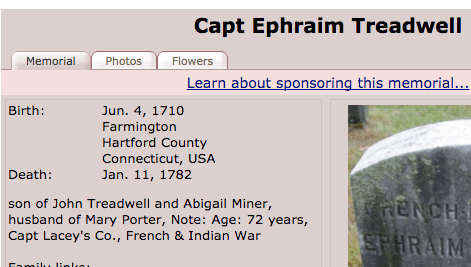 For example, the “FindaGrave” entry for Ephraim has facts and a photo of the headstone. A quick review of the two highlights that the entry doesn’t match the headstone. That’s a good indication that whomever is managing the FAG entry has likely added material they have that is not actually tied to the grave. Since you can’t confirm things like the birth date entry from FindaGrave, we’d only tie in the facts that are in the record: Name, birth year, death date, burial location and military service.
 incorrect data of their own, knowing that the Family Data Collection was transcribed at least twice and the headstone was commissioned, and likely approved, by a family member much closer to the time of death, we’d set the headstone date as Primary and the FDC date as an Alternate. Even here, we’ll enter both facts in Ephraim’s record, knowing one is likely incorrect, because with only two sources at this point we only have a theory on what happened to these dates, and we want to save the analysis for later when all the facts/sources have been reviewed.
 This is a bit of a judgement call (he much more likely would have been born in 1708 if we was 73 at death), but we’ll go with a simple 1792-93=1709 calculation to be consistent. His death date is in conflict with the church abstracts that we used for his death date originally, but since that source is also quite abstracted from original source material, for now we’ll again defer to the headstone.
 For Ephraim, 6 out of 10 trees list his death location as Fairfield, CT. Going through those 6 trees, we see that each use the Family Data Collection as the sole source for the fact. Given that we’ve reviewed the FDC, and put it on the fringe of credible sources, it’s safe to ignore the fact when we link with the Member Trees. If there was a good source, we would have added that source to our tree and then reattempted the match. We would have seen the “Different” flag removed, and proceeded to the next difference.