
In Part 1 of this series (Building a good Public Ancestry.com tree – Part One: sources, citations, facts, and proof), we talked about some of the fundamentals of how to understand the components of a properly sourced a tree on Ancestry.com. In Part 2 (Building a good Public Ancestry.com tree – Part Two: Attaching facts to sources, and using “wrong” facts in your tree), we talked about how it’s best to attach a fact to each source as it’s presented, as opposed to attaching all sources to the preferred fact. In Part 3 we’re going to walk through putting those approaches into practice using sources found in various Ancestry.com databases.
The key to creating a good Public tree is this: make sure you have a source for every fact you attach to an ancestor, with the caveat that Members Trees are NOT sources.
Start with what you know
With that in mind, you should start the tree with what you know. It’s ok at this point for there to be no sources attached to the facts, you’re just trying to get the outlines of your tree fleshed out with the data you know.
We’re going to use Captain Ephraim Treadwell (1710-1782) as an example for this process. This ancestor is in a “Working/Uncertified” tree of ours, and to start we’ve only attached a death record from “Connecticut, Church Record Abstracts, 1630-1920”. This is a good example of a skeleton tree that we might build out quickly to get an idea of the family, and then go back and flesh out the ancestors.

Review your “shaky leaf” hints one-by-one, with an eye towards accuracy
Just because something is listed as a “fact” on Ancestry, doesn’t mean it’s either a fact or accurate. Take a few moments to understand the source, give it a quick “smell test” and decide what/how you’re going to use the source.
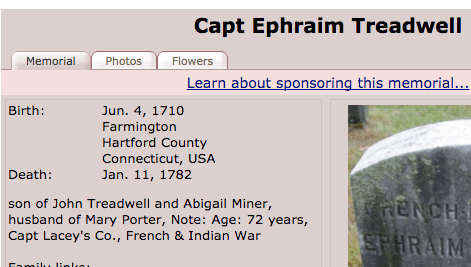 For example, the “FindaGrave” entry for Ephraim has facts and a photo of the headstone. A quick review of the two highlights that the entry doesn’t match the headstone. That’s a good indication that whomever is managing the FAG entry has likely added material they have that is not actually tied to the grave. Since you can’t confirm things like the birth date entry from FindaGrave, we’d only tie in the facts that are in the record: Name, birth year, death date, burial location and military service.
Let’s look at another example of how you want to review these sources for accuracy. One of the hints for Ephraim is from the “Family Data Collection”, and it lists his death date as: 1 Nov 1782. If you dig into what the Family Data Collection consists of (click the “Learn more…” link at the end of the record) you’ll see right away that this data is VERY derivative and quite separated from the original sources. The more that’s true for any source, the more likely it is to be unreliable. In this case it’s in a database that was spilt in 3 parts from an original database, and that original was hand-entered based on obits, family histories, family group sheets, books of remembrance, etc. which are almost never themselves original sources. So you have at least 4 levels between these records and the original sources, and the data has been transcribed by people at least twice.
When you compare the death date between the headstone photo and the Family Data Collection, they are not the same. In-fact they are very different: 11 Jan 1782 and 1 Nov 1782. Right away you should notice that in the US standard notation of dates, someone likely transcribed the numbers: 1/11/1782 vs. 11/1/1782. While headstones often have  incorrect data of their own, knowing that the Family Data Collection was transcribed at least twice and the headstone was commissioned, and likely approved, by a family member much closer to the time of death, we’d set the headstone date as Primary and the FDC date as an Alternate. Even here, we’ll enter both facts in Ephraim’s record, knowing one is likely incorrect, because with only two sources at this point we only have a theory on what happened to these dates, and we want to save the analysis for later when all the facts/sources have been reviewed.
Attach the facts to the sources
Going back to the FindaGrave example, we’ve identified the facts that are supported by this record: Name, birth year, death date, burial location and military service. When we merge the record into Ancestry, the tool defaults to the birthday listed in FAG, but we’re going to change it to “Abt. 1709” since the headstone only lists his age at his death in 1792.  This is a bit of a judgement call (he much more likely would have been born in 1708 if we was 73 at death), but we’ll go with a simple 1792-93=1709 calculation to be consistent. His death date is in conflict with the church abstracts that we used for his death date originally, but since that source is also quite abstracted from original source material, for now we’ll again defer to the headstone.
One key point to make comes up when we attach the burial location. The record lists the cemetery as being located in “Farmington, Hartford County, Connecticut, USA” but that does not follow Ancestry’s location naming standard. The “County” is omitted in their standard, and you should try and have locations noted as closely to that standard as you can because that’s how they index locations for searching. You have will have better results if Ancestry can use location information that matches their indexes.

We’ll ignore the other family members, again because the graveyard information doesn’t indicate those relationships. This will have created the source and attached 4 facts, but we’ll still need to go back and create the record for Ephraim’s military service manually.
Repeat this process for every source in with a shaky leaf, and when you’re done review your work. Do all the facts have at least one source? Are the locations standardized? Are the right facts set as Preferred? Do you have duplicate Alternate facts (we often do, and will attach a source to one of them, and delete the other)?
This entire process took me less than 5 min. to complete. It doesn’t take much time to link the hints up accurately, even when you have 15 hints.
Once this step is complete, we’ll move on to attaching Member Trees.
Attach ancestors from Member Trees that match your ancestors, but do so in a way that doesn’t attach any facts
The biggest issue with Ancestry’s Member Trees is that they are often poorly sourced, and very easy to copy to your tree. This creates a cycle where the trees themselves become sources for the facts about an ancestor, and the original sourcing (if it was there) is lost. As you repeat this, people will discover your tree, link to it using your tree as a source, and quickly the problem grows exponentially.
One way around this is to link your ancestors, but don’t use their trees to source your facts. To get around that, as we attach Member Tree review any facts marked as “new” to verify if they have a source you don’t have, and if they do, add that source, and then re-try the linking.
To do this, select “Review Member Trees” and “select all trees” before clicking on “Review Selected Tree Hints”.
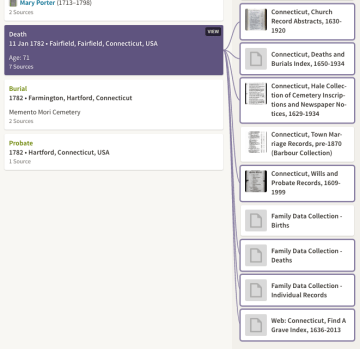
Initially, we see only one difference between the collection of Member Trees and our tree: “they” have Ephraim’s death location listed as “Fairfield, Fairfield, Connecticut, USA” instead of “Farmington, Hartford, Connecticut, USA”. To address the difference, cancel out of saving to your tree, and scroll through the list of matches to see which show the fact that doesn’t match your tree.  For Ephraim, 6 out of 10 trees list his death location as Fairfield, CT. Going through those 6 trees, we see that each use the Family Data Collection as the sole source for the fact. Given that we’ve reviewed the FDC, and put it on the fringe of credible sources, it’s safe to ignore the fact when we link with the Member Trees. If there was a good source, we would have added that source to our tree and then reattempted the match. We would have seen the “Different” flag removed, and proceeded to the next difference.
Once you’re comfortable that all of the facts match as well as they are going to, review and make sure there are no checkmarks in front of any facts. If you do have checkmarks, it means you’re about to link a fact with “Ancestry Member Trees” as the source, which we’re trying to avoid. Repeat the above review/link source process until there are no checkmarks.
Once you’ve attached Member Trees to your ancestor, you’ll have a link in the system that will help you be notified when others find information on them, and others can easily click the source and review your matching tree, but your tree will continue to be properly sourced with only the sources you’ve reviewed and attached.
What’s next?
From here, you can run a search in Ancestry, and since you have a solid base of facts, your search results will much more focused and likely to be an accurate match. Just attach new sources and facts as detailed above, and your tree will continue to be well sourced.
In the final installment of this series, we’ll share ideas on how to attach and source your own research to your Public Ancestry.com tree!


 Taking a look at Wesley’s father James, we see a range of birth dates that range from 1790-1799. We don’t have a great record that indicates his birth date, but most of what we have clusters around 1796-97. Seeing the range helped when we found a Family Bible entry for James that indicated 11 Aug 1796. Even though the bible entry was completed at some point after 1855, so it wasn’t entered at his time of birth, but we can be comfortable that the date fits the previously known range. It also helps when reviewing early censuses. We reviewed the 1820 Census with the idea that his age would likely be between 21 and 30, but that since we only have one outlying record that shows 1790, it’s likely he’d be <30 years old. It’s also likely his age was closer to 23-24 and it was not uncommon for male children to be living on their parent’s farm at that age. It’s helpful to be able to understand all of that from a quick glance at his record in our tree, instead of having to dig through 9 sources to figure out his birth day.
 and reassign those it would be difficult. I feel like it was good I was concerned about that as it relates to a test, and like it will be less of a concern when we’re not limited to a short beta.
 their most simple form: indicating a source of information to support a fact.
 your ancestors. Family bibles, Ancestry.com indexes, headstones, interviews with family members, etc. are all examples of sources that yield clues about your relatives.
 er ancestry, so we likely won’t do much more digging to settle on a date. However, on my Tradewell line, we’re currently researching a theory that Reuben Treadwell (1755-1742) is my 4xGGF, and there is another Reuben Treadwell born in the same area of Connecticut in 1752. It’s essential to our research that we nail down both birthdates as accurately as possible, and then verify which Reuben is being referenced by each source. So, in some cases we don’t need to prove beyond a 5-6 year spread when an event occurred, but in others a 3 year difference is critical.